

The StartupBros logo is dead, and I killed it…

While our old logo wasn’t in dire need of replacement, we weren’t in love with it, so we decided to change it up. I’ve had a lot of logos designed, so I’ve developed a pretty good method to finding the one your customers love the most. As you may know, this is one of the most controversial things I’ve ever written (a surprise to me).
There is definitely no shortage of people who don’t like this method, even HATE it. That’s fine by me. This is the best method I, as an entrepreneur, have developed to get a logo created. It’s an efficient way to get an effective logo. It doesn’t take into account anything I can’t measure, and I realize many designers think that is the wrong way to go about logo creation. It’s just the way I do it. That being said, keep reading below if you’d like to see how I do… Below you’ll find my “Visual How-To Guide” to getting the perfect logo designed. We recently wrote about the best logo makers if you want a different option.
But now, I’ll walk you through the recent StartupBros redesign. So let’s get started…
Step 1 – Get Logos Designed
First you need to get some high-quality logo designs to test. I’m going to suggest you use 99Designs for this and any other logo design you need done. You simply won’t get as much creativity for a better value.
A lot of designers hate 99Designs, but that is because they can’t compete with it. For $300 you can get hundreds of different logo designs from different artists. It’s an absolute steal.
I’ve been running contests on there for a few years now, and I have learned a few tricks that will maximize your value and make sure you get some amazing logos to choose from. Here’s the basics of launching a logo design contest –
The Right Way to Launch a Contest
- Head over to 99Designs and Sign Up for an account
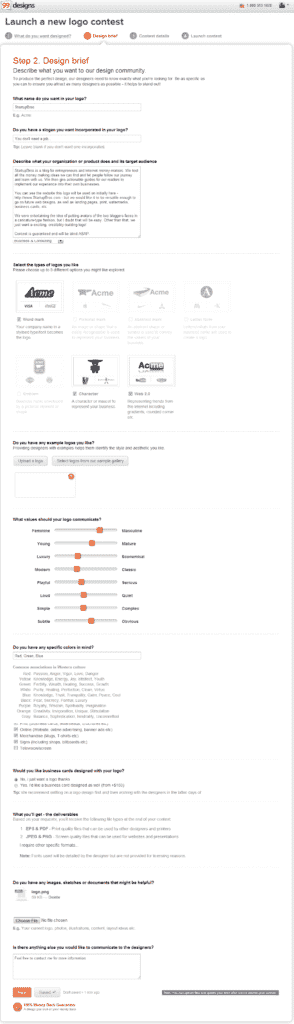
- After you’ve signed up for an account, start a new “Logo Design” contest and fill out the Design Brief. The more details you can give on here, the better. Sometimes, I even attach various logos I like, so the designers get an idea of my style (but I didn’t do that below). Here is what my design brief looked like for the StartupBros logo redesign –
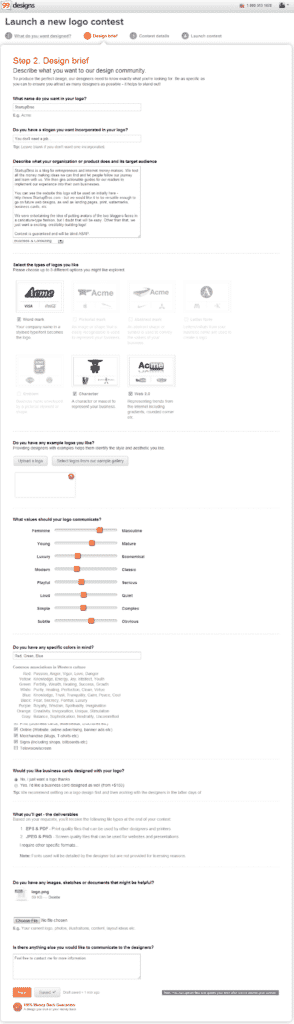
- On the next page you’ll set up payment options and a few other settings. Here are the settings I recommend using most of the time (Note: If you don’t see the “Blind Contest” option, you’ll have to ask 99Designs support to switch it to blind after the contest is live) –
- Pay for the contest and launch it on the next page, and then your contest should be live.
Maximizing the Value of Your Contest
There are a couple of things I do after a contest is live that make sure I get an awesome logo. Honestly, if you don’t do these next steps, I can’t promise you’ll find a logo you and your audience loves. What you’ll basically be doing is going around to existing/past logo design contests to find the best designers, and then messaging them to rub their ego and beg them to join your contest. I’ve done a lot of testing with this, and this is the best way to do it –
- Click “Browse” to browse around the existing/past contests and open up 10-20 of them in new tabs
- On each contest page, click the “Designers” tab. Then, open up 5-10 designer profiles from each contest.
- In each designer profile tab, click “Send message” and send them a message inviting them to your contest. You can also use the built-in invite feature, but I usually just send messages. Here is a message I sent out for example –
Hello, I love your past work and put you on my watchlist a while back hoping I could get your design-brilliance on my next logo. I just launched a new logo contest for my new project, and would really love to get your input on it. Really looking forward to seeing your submission, Will (link to my Design Brief on Live Contest Page)
As you can see, I make it known that I like their past work and tell them they have been on my watch list (even if they haven’t). I’ve found that by handing out a few compliments, you can get the top-tier designers to stoop down for a lower payout contest (which they rarely do). I send these messages to at least 100 designers, but sometimes even more if it is an important logo and I want to see a lot of different concepts. It gets monotonous, but it’s definitely worth it in the end.
Watch Logos Start Pouring In
You’ll start to get logos pretty quickly, and within a day or two you should have 25+ to choose from. I usually just go through and rate them as they come in. Make sure to give good feedback in your comments to the designers. They will read everything and re-design their submission based on your requests. Once you have found 2+ logos that you like, you can proceed to the next step and start testing them against each other. I should note though, I always ask the designers if it is alright that I test their design before moving forward. I’ve never had one not give me permission…
Step 2 – Setup tests
You basically have two options when it comes to running these tests. Luckily, they’re both free with a 30-day trial as of now… If you already have a website or are hosting your landing page yourself, then you’ll be using Visual Website Optimizer to test traffic that comes to the page. This is the method I’ll be showing below. If you don’t have a website, then I’d direct you to this article on using Unbounce to validate business ideas. The only thing to keep in mind is that the only variation should be the logo. So, if you are using Visual Website Optimizer, proceed reading below…
Setting Up the Test
- Create an account on Visual Website Optimizer with a Free Trial account. It should be pretty quick and easy.
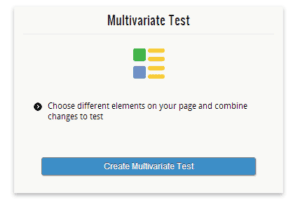
- Create a Multi-Variate Test, and enter the URL to the page you’ll be testing.
- This should bring up a screenshot of your website. Click your logo, then change the image with your designs from 99Designs.
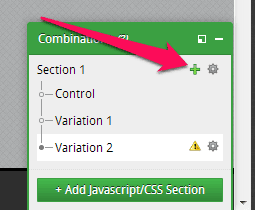
- You can add additional variants on the bottom-right corner
We are testing 11 logos for the StartupBros re-design. Here they are –
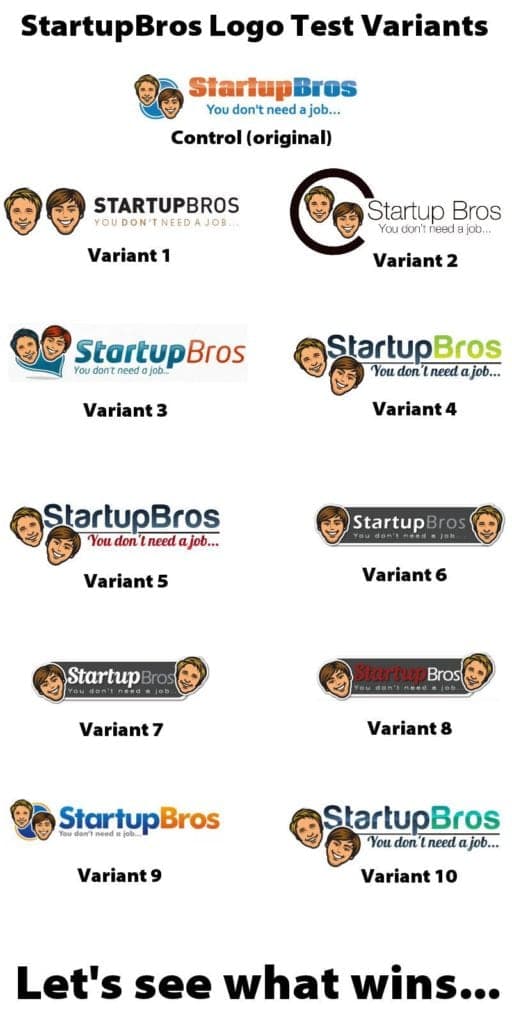
After you are done adding variants, click “Proceed to Next Step” in the top right –

The next page will ask you to set up your conversion goals. You can set up multiple goals, and I would encourage you to. Here are the ones I set up.
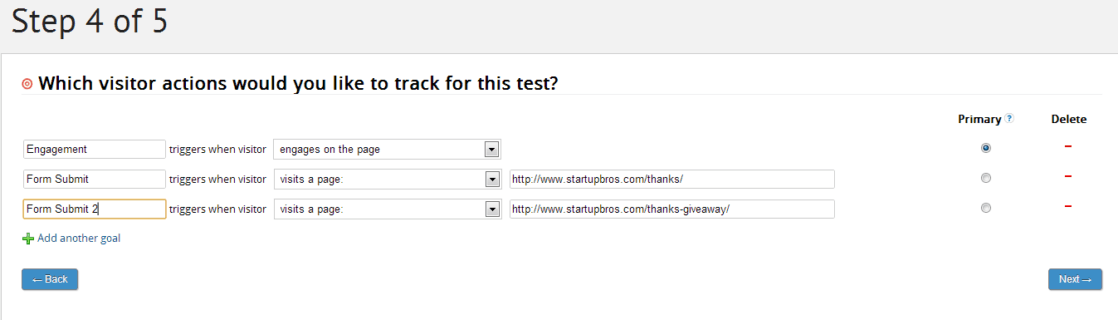
Next is the Step 5 page, there a few things you should do here –
- Enter a name and hypothesis/reason for your test
- Add a * on the end of your URL if you want the test to apply to all of your traffic (which I do). It would be useful to not do this if you were testing an image on a specific page of your website, like a landing page.
- Integrate with Google Analytics (you’d better have analytics…)
- You can also set it to “Automatically disable losing variations”, but I like to be hands on with my testing.
Here is an example of my “Step 5” settings –
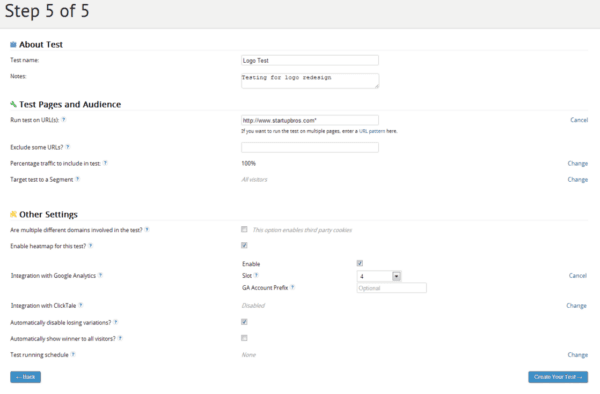
We’re almost done – I promise! Now you just need to set up your tracking code(s). I use Thesis so this is pretty easy for me (and that is what is shown in the picture below), but most WordPress themes should make it easy to add things into the of a document.
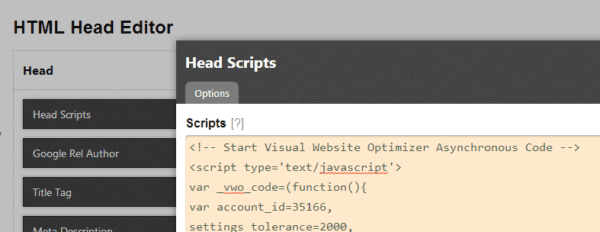
There is also a WordPress Plugin you can use to set up the code on your site. Just make sure the end result is this –
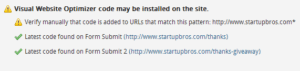
After you see this, start your test –
Now your test should be running smoothly, but I’d encourage you to both check out everything in the “Live Preview Combinations” area, as well as test on different computer to be sure everything is going right.
Step 3 – Drive Targeted Traffic
This step should be easy if you already have an established website, since you can just sit back and wait to see the results (that’s what we are doing). If you are running an Unbounce landing page, you’ll have to run some targeted traffic via PPC or content marketing of some sort. Just make sure it is your ideal customers who are visiting, because that’s who you want making the decision on your logo.
Step 4 – Results
The ideal amount of time to run your test will depend on your traffic volume and the number of variations you’re testing. Here is how our test went…
Day 1
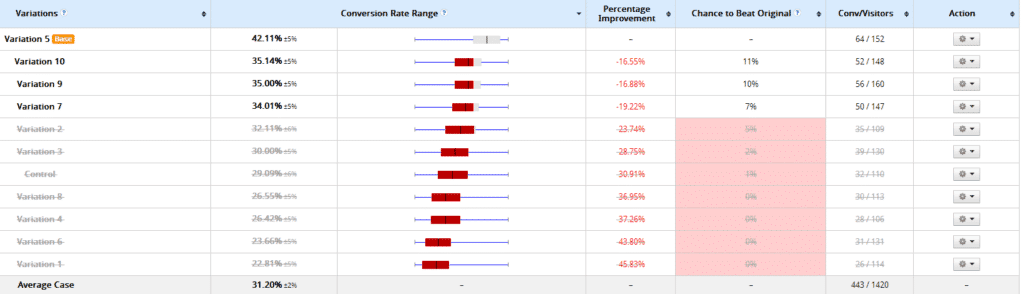
By day one we can already see some of the variants drop off, all though it is a little early to make any judgement with such little data. I did turn off the ones that were really not looking good (all the variants with less than a 5% chance to beat the base variant).
You’ll see below that some of the variants I turned off ended up making a comeback. This is due to people that are assigned to a specific variant coming back to the site in the days after their first visit. Obviously, this is a good thing and something we want to keep in mind.
Day 3
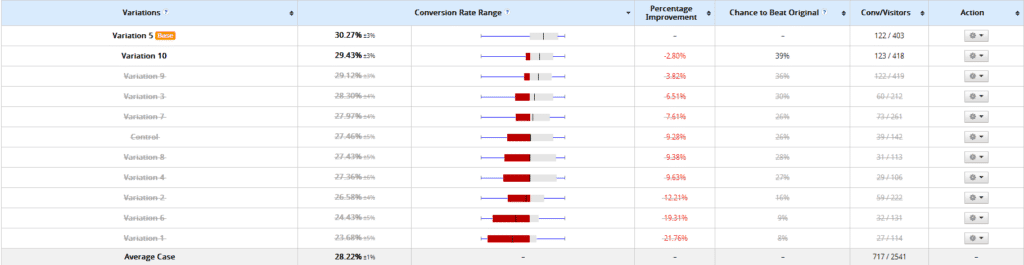
By day three we had enough data to see where things were going. You can see almost all the variants had a slight improvement from day one. This is again due to repeat visitors (which is the goal we are measuring).
Day 5
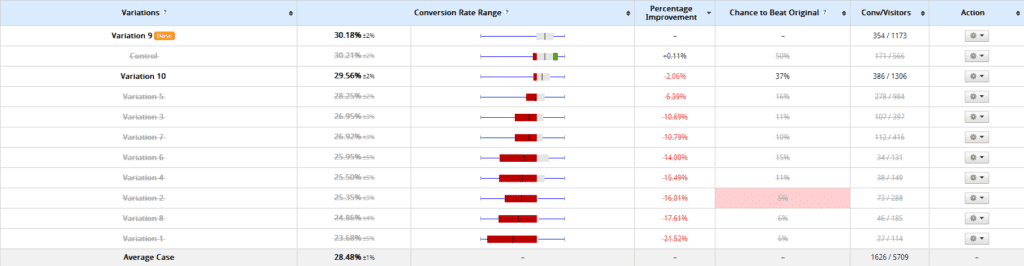
By day five, we had enough data to comfortably make a decision. Note – In an experiment like this, the control will raise naturally over time. The reason for this is that your regular readers will be shown the original logo that is in their cache (the control). These are our most engaged readers, and thus they skew the data on the control a little over time.
Step 5 – Select a Winning Logo Design
Now that you have a good amount of data, you can confidently make the right decision and select your winning logo. Just head back over to 99Designs and select a winner, then the logo is yours. The designer will send you the files via 99Designs within a few hours. You can see in our experiment, our control ended up doing pretty well. Again, keep in mind that the control will always be artificially high in this experiment, and will be more artificially high for people with a more dedicated following. This is because the past readers (regulars) will be shown the control. We like our new logo much more, and I’m happy I decided to run this contest and test.
What Do You Think?
So, what do you think? Think I missed anything? Do you know a better way? Think this was a big waste of time? Tell me about it in the comments! And as always, if you decide to use this method and have any trouble with it, comment below or email me at will <at> startupbros.com and I’ll be there to help! God speed, Bros!
111 Comments
Nice new logo guys! Also a great insight into how to get hold of a really good one. I made mine myself, its a great way to learn a little about new programs such as Paintshop Pro and so on.
Thanks a lot, glad you enjoyed it! Yea, there is definitely a lot to learn in the world of design...too much for me :)
You guys have the best "How-To's" for new ventures, whether it be actual business ideas or learning new techniques and skills. The ideas coming from you guys are awesome!! Thank you!
Damn, thanks man! Will has been tearing it up, this guide is going to save a lot of people A LOT of money (and is already getting a bunch of designers all sorts of angry :)
Hate mail? For this? All I can say is you always have to consider the source. I read this yesterday and instantly shared it on twitter, fb, linkedin, and g+. Great info, well presented. You go Will!
Thanks for this. Most people would charge for these very informative posts. Any entrepreneur would gladly welcome successful tips if can save them time or money. Keep em coming guys.
You tested how many conversion/visitors each page gets that has a different logo. What does conversions mean to you. What did they have to do in order to be "converted." Also, does the logo of the website really affect the conversion rate that much?
I don't know why you received hate mail. This is a genius logo hack.
People that are hating are probably graphic designers that need to move on from competing with crowd sourcing websites. Great article. I will use it when I design my next logo.
Some (overpriced) designers get REAL upset about this stuff because it threatens to cut them out of the equation. When you threaten someone's job you can't expect them to think real rationally about the ideas :) Thanks a lot for sharing StartupBros posts, it's truly the highest compliment. It's super important for us! Have a blast today, Wally!
Haters that are scared for their jobs
Awesome Matt, thanks so much for commenting and letting me know what you thought. Glad in this case it's positive :-P You da man! Will
Amen - show us what you get with it!
Awesome, thanks a lot Wally! If I would have seen your shares, my Monday would have been much more positive :-P Thanks Wally!
Thanks Scott - as long as I'm helping entrepreneurs make it I can take the hate haha
This is a wonderful post. I think I'd love every logo that you guys adopt as long as it features the StartUp Guys heads! Stay terrific!
Will. In depth article and informative - great quality! But I'm not sure I like this method. Buy that doesn't justify any hate mail. I think maybe you are missing some of the long term assets of your logo by using some relatively short term measurements and by lowering costs. For instance - the makeup of the websites audience may not be the exact audience you want - but they are the ones deciding your logo through conversions. You could be affecting your future conversions of the audience you do want. Also, now that you use this logo you may be attracting a different type of audience than you intended - or different from who you should - because you went with the relatively short term results rather than having an independent expert plan and design accordingly. Lastly, maybe you missed out on some of the logo and branding design advice you would have gotten from a high quality designer. Anyway- still a great post and a good option out of many available options.
Great Job Will! Your website and your articles has been a tremendous help for me. The information I've gotten from these has been invaluable to me. I even bookmarked some of them ...heck most of them for reference. I learned in here what they didn't teach me in college....like hmmm "How to Create a Logo design?" lol Keep up the good work and maybe one day I'll join you guys at start up bros if i get lucky! haha PS: I'll buy you a beer when I see you! --Harvey
Thanks so much for your support Tree Turtle!! You're one of the most terrific humans I know!
Too much hate online and not enough love! Personally, regarding this article I skipped over only because 99 designs was suggested. Over the years I mastered the outsourcing game, so I am able to pinpoint to the atom my ideal logo designer using services such as oDesk. From the very beginning I filter for the type of client I am looking for, and literally within minutes of posting I already have offers. I then decide to look at there work history, and can then narrow it down. As long as I like the designer, I can begin to communicate with him or her, and usually it takes 2 to 3 drafts before the vision is implemented. Now I have around two to three designers I have saved, so when a job pops up, I contact them first to see if they are interested, and it works out because they understand my taste. Nothing against 99 designs, it was great for me in the beginning, but my last bout with them ended because my price range did not attract many interested contestants. Thanks, Omar